What defines flat lay jewelry photography
Flat lay jewelry photography is defined by its strict 90-degree overhead camera angle. Unlike traditional packshots shot at a 45-degree angle or straight-on profile shots, the flat lay eliminates vertical depth. The jewelry, the props, and the background all exist on a single horizontal plane.
This specific perspective fundamentally changes how jewelry is perceived. Instead of focusing solely on the structural height of a prong setting or the profile of a shank, flat lays emphasize the silhouette, the footprint of the piece, and its relationship to the surrounding environment.
The Focal Plane Advantage
In macro jewelry photography, depth of field is a constant battle. When shooting a ring at a 45-degree angle with a 100mm macro lens at f/8, the front prong might be in sharp focus while the back of the band blurs. To get the entire piece sharp, photographers must use focus stacking—taking dozens of photos at different focal distances and merging them in software.
Flat lay photography minimizes this issue. Because the camera sensor is parallel to the surface where the jewelry rests, the entire piece falls within the same focal plane. A 1ct round-cut solitaire lying flat on a marble slab can often be captured entirely in focus in a single frame at f/11, dramatically reducing post-production time.
Visual Hallmarks and Storytelling
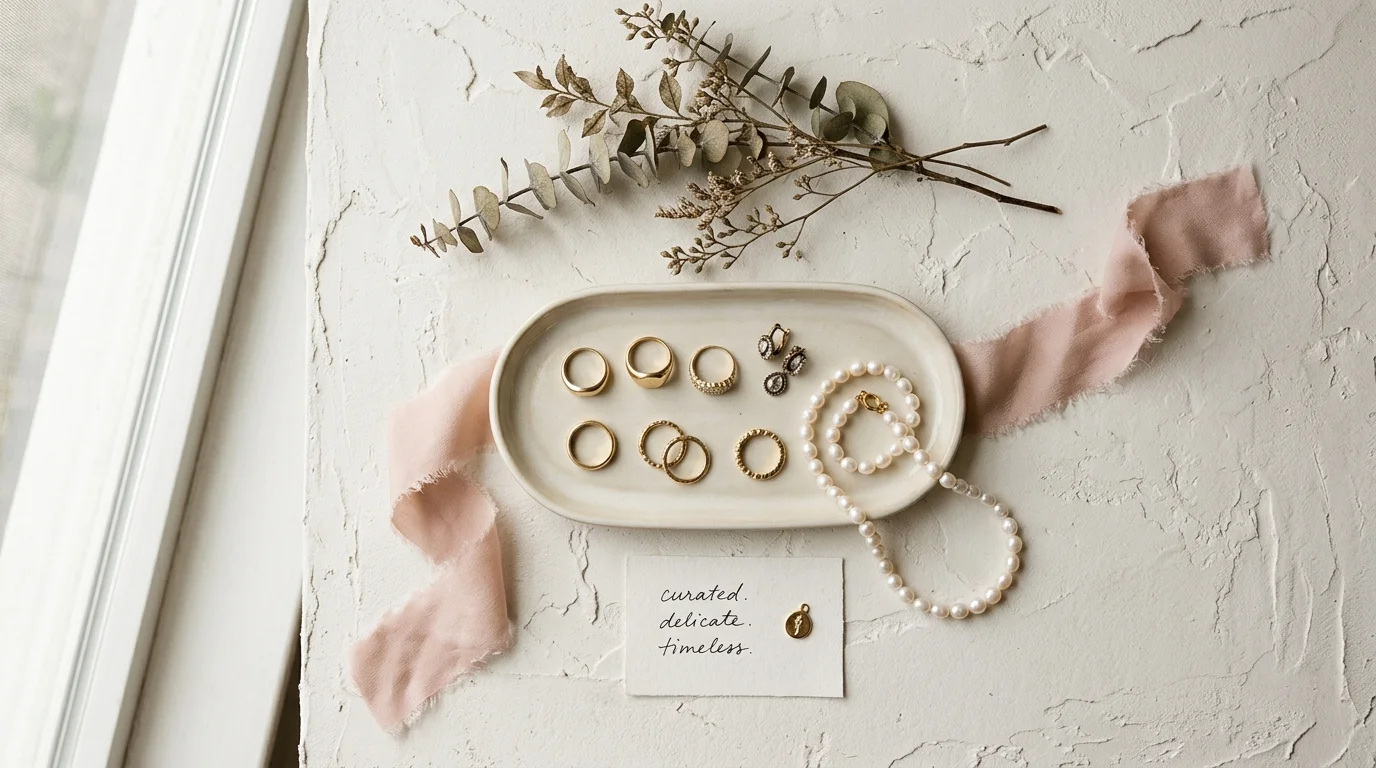
The flat lay is inherently editorial. While pure white background (e-commerce) photography isolates the product, the flat lay contextualizes it. The visual hallmarks of a high-end jewelry flat lay include:
- Intentional Negative Space: Flat lays rely heavily on composition. The empty space around the jewelry is just as important as the piece itself, providing a canvas for text overlays or allowing the viewer's eye to rest.
- Textured Backgrounds: Because the background fills the entire frame, texture does the heavy lifting. Raw linen, porous travertine, brushed concrete, and matte acrylic are staples.
- Contextual Props: Botanical elements, raw uncut gemstones, silk ribbons, and antique styling tools are used to build a mood board effect, communicating the brand's aesthetic (e.g., vintage, minimalist, or bohemian) without words.
Lighting Characteristics
Because the camera is positioned directly overhead, lighting a flat lay requires a different approach. The light cannot come from the same angle as the lens, or the image will look entirely flat and two-dimensional.
High-end flat lays are typically defined by one of two lighting styles:
- Soft, Diffused Wash: A massive overhead modifier (like a 4x4 scrim) floods the scene with even, soft light, minimizing shadows. This creates a clean, ethereal, and highly modern look.
- Directional, Hard Light: A bare strobe or harsh continuous light is placed at a low angle (e.g., 30 degrees to the surface), casting long, dramatic shadows across the background. This emphasizes the texture of the surface and the height of the jewelry, creating a moody, editorial feel.
When to use flat lay jewelry photography
Flat lay photography is not a replacement for your standard white-background e-commerce packshots. Customers still need to see the clean, unstyled details of the piece to make a purchasing decision. Instead, flat lays serve as the connective tissue of your brand's visual identity, used primarily for top-of-funnel marketing and aesthetic world-building.
Social Media and Discovery Commerce
Platforms like Instagram, Pinterest, and TikTok Shop are visual discovery engines. A standard white packshot of a gold necklace rarely stops the scroll. A flat lay of that same necklace, styled alongside scattered pearls on a piece of raw silk with dappled sunlight, triggers an emotional response.
Flat lays are uniquely suited for Instagram grid layouts and Pinterest boards because their 90-degree angle feels graphic and organized. They are highly shareable, often saved by users to aesthetic mood boards, which drives organic reach.

Marketplaces (Etsy, Faire, Amazon Handmade)
If you sell on crowded marketplaces, your primary challenge is standing out in a grid of hundreds of similar products. While Amazon requires pure white backgrounds for main images, platforms like Etsy and Faire encourage lifestyle imagery.
Using a beautifully styled flat lay as your primary listing photo immediately differentiates your brand from competitors using generic vendor renders or poorly lit smartphone shots. It signals higher perceived value, allowing you to command premium pricing.
Email Marketing and Web Banners
The horizontal nature of flat lays makes them perfect for website hero banners and email newsletter headers. By composing the flat lay with the jewelry clustered to one side (leaving the other side as textured negative space), you create a natural canvas for typography. You can overlay "Spring Collection" or "Mother's Day Gift Guide" directly onto the negative space without obscuring the product.
Showcasing Collections and Scale
Flat lays are the most effective way to photograph multiple pieces together. Trying to shoot a matching necklace, ring, and earring set on a ghost mannequin or bust is nearly impossible to compose gracefully. On a flat surface, you can arrange the pieces organically, showing how they relate to one another in scale and design.
How to shoot flat lay jewelry photography manually
Executing a professional jewelry flat lay requires overcoming a fundamental physics problem: the angle of incidence equals the angle of reflection. When you point a camera directly down at a highly polished piece of metal, the metal acts as a mirror, reflecting the black camera lens and the ceiling straight back into the shot.
Here is the exact studio workflow to shoot editorial-grade flat lays manually.
The Overhead Rig
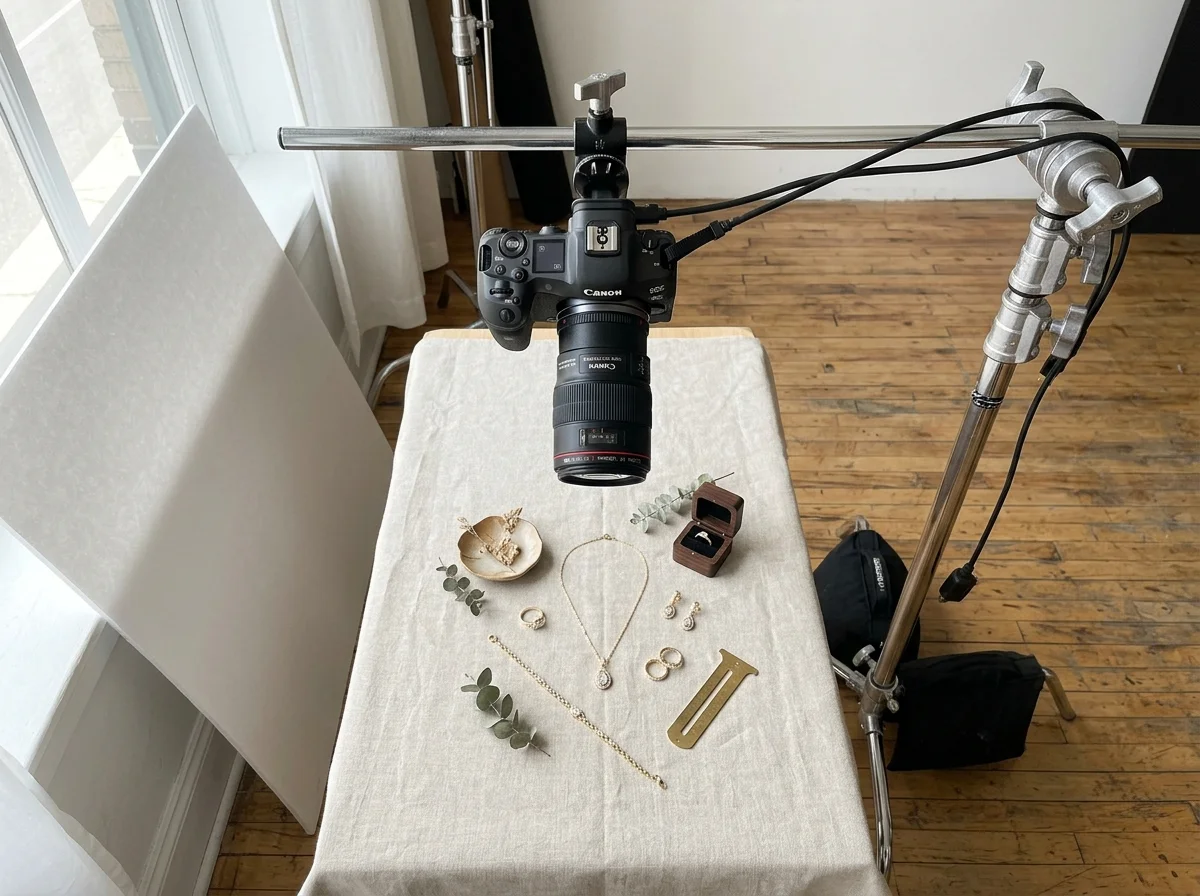
You cannot shoot professional flat lays by simply holding your camera over a table. Any slight movement will cause motion blur, and you will not be able to precisely adjust the styling while looking through the viewfinder.
- The Tripod: You need a heavy-duty tripod with a horizontal center column (e.g., Manfrotto 055 series) or a C-stand with a boom arm.
- Tethering: Connect your camera to a laptop using a tethering cable and software like Capture One or Lightroom. This allows you to view the flat lay on a large screen in real-time, making micro-adjustments to the jewelry arrangement using tweezers.
- The Lens: A 100mm macro lens is the industry standard for jewelry, but for flat lays featuring larger collections or long necklaces, a 50mm or 85mm lens may be necessary to capture a wider field of view without raising the camera to the ceiling.
Camera Settings for Edge-to-Edge Sharpness
Even though the jewelry is lying flat, the height of a ring setting or the thickness of a bangle still introduces some depth.
- Aperture: Set your lens to f/8 or f/11. This ensures that both the top of the gemstone and the textured background beneath it remain razor-sharp.
- ISO: Always shoot at ISO 100 to eliminate digital noise and preserve the micro-details of the metal and stones.
- Shutter Speed: If you are using studio strobes, sync at 1/125s or 1/200s. If using continuous light, your shutter speed will depend on the light intensity, but because the camera is locked on a tripod, you can drop the shutter speed as low as needed (e.g., 1/10s) without worrying about camera shake.
Lighting the Flat Lay
Never place your light directly over the camera. This results in flat, featureless lighting that destroys the dimension of the jewelry.
- The Main Light (Key): Position a large softbox (e.g., 3x4 feet) at a 45-degree angle to the table, sweeping light across the surface. This creates soft highlights on the metal and casts gentle shadows that give the flat lay dimension.
- The Fill: Place a white reflector on the opposite side of the table to bounce light back into the shadows, ensuring they don't go completely black.
- The Flag: To create deeper, moodier contrast (often used in men's jewelry or vintage styling), use a black foam core board instead of a white reflector to absorb light and deepen the shadows on one side.
Managing Reflections (The Black Hole Effect)
When shooting overhead, the flat surface of a ring band or a pendant will reflect the dark camera lens above it, creating an ugly black spot on your jewelry.
To fix this, you must build a "reflection tent." Cut a hole just large enough for your lens in the center of a large piece of white foam core. Mount this foam core horizontally directly above the jewelry, with the camera lens poking through. Now, the jewelry will reflect the clean white surface of the foam core instead of the dark studio ceiling and camera body.
How to generate flat lay jewelry photography with Hylo
Shooting flat lays manually requires a dedicated overhead rig, specialized lighting modifiers, and hours of styling with tweezers and museum wax. Today, AI can generate these exact editorial setups in seconds, but not all AI tools handle jewelry equally.
General-purpose design tools like Canva and Photoroom, or product AI tools like Pebblely and Booth.ai, are excellent for flat lays of matte products like cosmetics or packaged food. However, jewelry introduces complex refractive indices. When you put a diamond ring into a generic AI generator, the AI often hallucinates the reflections, melts the prongs, or flattens the gemstone's facets.
Hylo is built specifically for the jewelry industry. It replaces the multi-thousand-dollar daily studio booking by preserving the exact micro-details of your CAD renders or raw packshots while generating photorealistic overhead environments.
The Hylo Flat Lay Workflow
- Start with a Clean Packshot: Upload a high-resolution, pure white background image of your jewelry to Hylo.
- Use the Canvas Editor for Collections: If you want to create a multi-piece flat lay (e.g., a curated ear stack or a bridal set), use Hylo's Canvas Editor. You can upload multiple packshots, remove their backgrounds instantly, and arrange them on the digital canvas exactly as you want them to appear in the final flat lay.
- Configure the Brand Kit: Open your Brand Kit settings and explicitly set the camera angle to Overhead / Flat Lay. This is a critical step. It tells the AI Photoshoot engine to map the lighting and shadows for a 90-degree perspective, ensuring the jewelry doesn't look like it's floating awkwardly in space.
- Select or Prompt the Environment: Browse Hylo's Creative Library for pre-built flat lay environments (like raw linen, marble slabs, or floral arrangements). Alternatively, write a custom prompt tailored to your brand: "Overhead flat lay of a gold necklace on a piece of raw travertine stone, scattered dried eucalyptus leaves, warm morning sunlight casting long shadows."
- Generate with AI Photoshoot: Hylo's AI Retouch and Photoshoot engines work together to cast physically accurate drop shadows beneath your jewelry while preserving every facet of your diamonds and every reflection in your metal.
Examples across jewelry categories
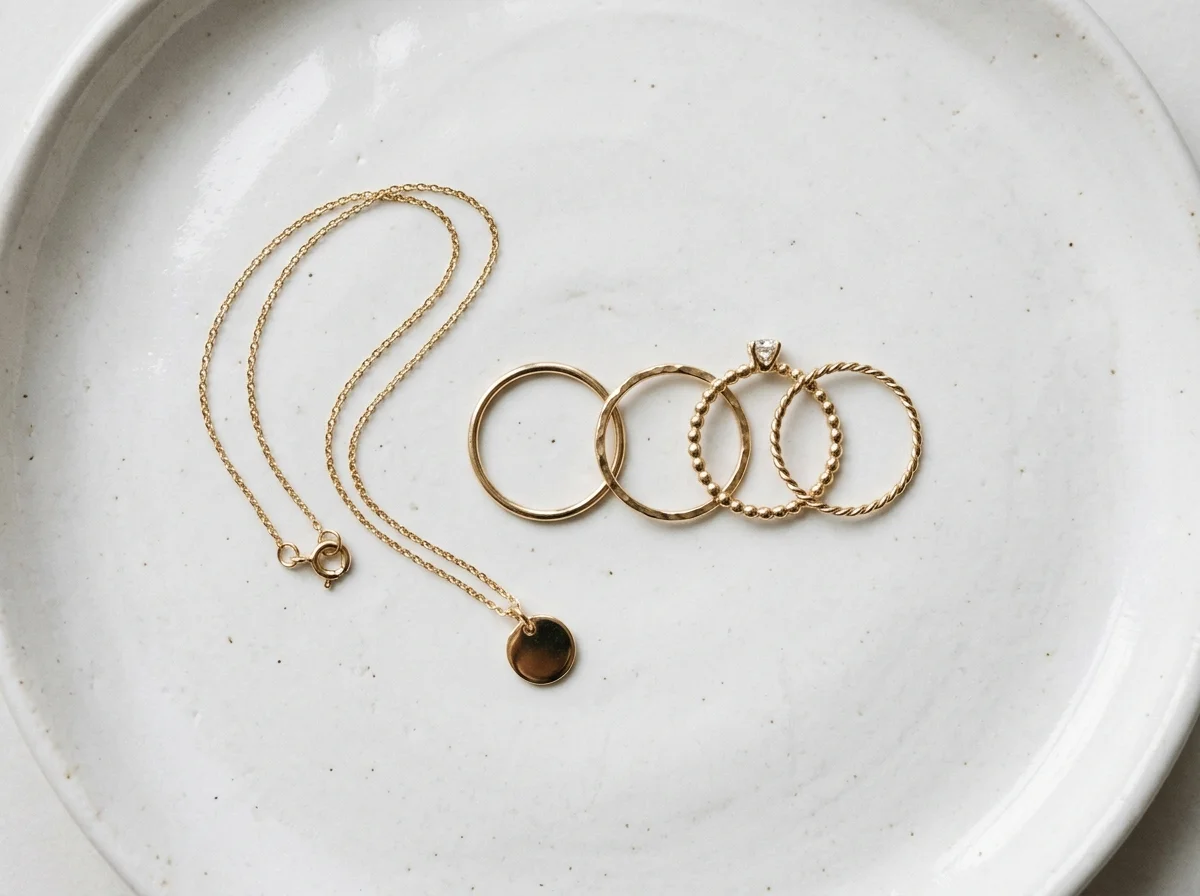
Hylo's public inspiration gallery currently curates 400 real, pass-graded, safety-checked jewelry looks. By analyzing these generated images, we can see exactly how flat lay styling adapts across different jewelry categories.
Rings (131 Gallery Looks)
Rings are the most common subject for flat lays, but they present a unique challenge: a ring lying flat on its side doesn't show the main stone effectively.
- Styling Tip: In our gallery, the most successful ring flat lays utilize small props to prop the ring up at a slight angle while maintaining the overhead camera perspective. Using vintage ring boxes, resting the band against a raw quartz crystal, or placing it in a shallow ceramic dish adds context and allows the center stone to catch the light.
Necklaces (116 Gallery Looks) and Pendants (42 Gallery Looks)
Necklaces and pendants are inherently suited for flat lay photography. Unlike ghost mannequins, which can make chains look stiff, flat lays allow you to manipulate the chain into fluid, organic curves.
- Styling Tip: Never lay a chain in a perfect, rigid circle. Use tweezers to create an "S" curve or a loose, cascading shape. Our gallery shows that pendants perform exceptionally well when styled on textured fabrics like silk or linen, which contrast beautifully with the high polish of the metal.
Earring-Studs (28 Gallery Looks)
Stud earrings are small and can easily get lost in a flat lay if the props are too large.
- Styling Tip: Grouping is essential. The gallery highlights looks where multiple studs are arranged in a curated "ear stack" layout, or placed neatly along the edge of a textured stone coaster. Keep props minimal—use fine grains of sand, small pearls, or delicate flower petals so the scale of the earrings remains clear.
Bracelets (17 Gallery Looks) and Bangles (17 Gallery Looks)
Bracelets and bangles require careful attention to shape. A soft chain bracelet needs to be styled with deliberate curves, while a rigid bangle relies entirely on its circular geometry.
- Styling Tip: For bangles, overlapping multiple pieces creates a sense of abundance and luxury. In the inspiration gallery, stacked bangles shot overhead with hard, directional lighting create interlocking rings of shadow that make for incredibly striking, graphic imagery.

Common mistakes in flat lay styling
Even with top-tier equipment or advanced AI, poor styling choices can ruin a flat lay. Here are the most common mistakes jewelry brands make:
1. Overpowering the Subject
The most frequent mistake is clutter. It is easy to get carried away adding ribbons, flowers, stones, and trays. If the viewer's eye is drawn to the beautiful vintage scissors in the corner of the frame rather than your $2,000 diamond pendant, the flat lay has failed. Rule of thumb: The jewelry should be the brightest, sharpest, and most central element in the composition.
2. The Non-Parallel Camera
If your camera is tilted even slightly—say, 85 degrees instead of exactly 90 degrees—the perspective distorts. Circular plates look like ovals, straight lines converge awkwardly, and the focal plane shifts, causing parts of the image to blur unexpectedly. If shooting manually, always use a bubble level on your camera hot shoe.
3. Floating Jewelry (Unrealistic Shadows)
When compositing flat lays in Photoshop or using basic background removal tools, editors often apply a generic, uniform drop shadow. Real objects in a flat lay block light dynamically. A thick bangle will cast a longer shadow than a thin chain. If the shadows don't match the direction of the light source, the jewelry will look like a cheap sticker floating above the background. Hylo's AI Photoshoot solves this by rendering physically accurate, directional shadows based on the lighting prompt.
4. Ignoring the Chain
For necklaces and bracelets, the chain is part of the design. Leaving a chain tangled, kinked, or awkwardly bunched up signals low quality to the buyer. Take the time to smooth every link, ensuring the chain flows naturally across the surface.